
Featured Content
AI Agent Skills: Stop Paying for Tokens You Don't Need
AI agent Skills replace bloated instruction files with on-demand context loading — cutting token waste by 80% for Excel and Power Query workflows.
KPI Tree for Performance Management: A Visual 7-Step Guide
KPI Tree for Performance Management: a practical 7-step method to align strategy with KPIs, cut metric overload, and create dashboards people actually use.
Why Your BI Team Needs a Product Mindset, Not Just Reports
Discover why developing a BI team product mindset is essential for building compounding value. Learn how to shift from reactive reporting to strategic product thinking.
DAX and UDF SVG Charts in Power BI: Complete Guide
Learn to build DAX and UDF SVG charts in Power BI with this complete guide. Create custom visualizations using pure DAX code with dynamic scaling and conditional formatting.
DAX + UDF = the React of Power BI
Learn how to combine Power BI DAX user-defined functions with HTML visuals to build reusable KPI cards, tables, and progress bars that wow report stakeholders.
Automating Power BI Themes with Fabric, Notebooks and BIBB Theme Generator API: A Complete Guide
Learn how to automate Power BI report theme updates using Microsoft Fabric, Python, and the BIBB Theme Generator API for seamless theme management.
What is a Template in Power BI? Settling the debate.
Understand what each Power BI Template type does, when to use it, and how it shapes the user experience.
Improving BI User Experience in Corporate Environments: Practical Strategies That Work
Discover actionable techniques for improving BI user experience in corporate environments, focusing on user personas, training, and documentation.
Data Exfiltration in Power Query - Understanding the Risk and Protections
Data Exfiltration in Power Query: Understanding the Risk and Protections
Automation of the 'Meet the Team' PDF Slides with Power BI
Automate 'Meet the Team' PDF slides using Power BI, SharePoint, and Power Automate to save time, ensure consistency, and scale across proposals.
Master Power BI Time Comparisons and Top N Analysis for Optimal Performance
Learn how to perform Power BI Time Comparisons and Top N Analysis with optimal performance using calculation groups and field parameters instead of slow RANKX functions.
AI Agent Skills: Stop Paying for Tokens You Don't Need

Why Agent Skills Matter - Your AI Instructions Are Bleeding Tokens
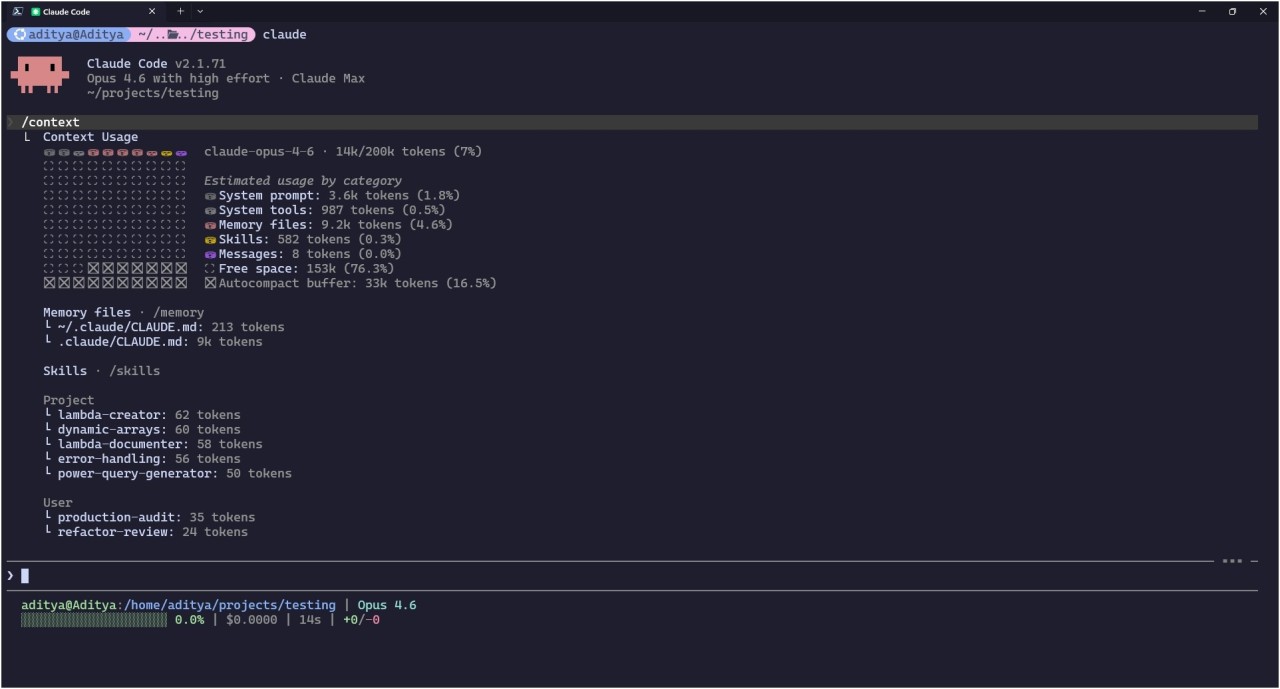 Claude context usage analysis.
The old way of teaching AI is broken. And something better is replacing it.
Have you ever wondered why you need to keep recharging your AI agents every other week? Or why you’re working with AI and it suddenly says you’ve hit the context window and it needs to summarise?
I was there a few months ago. Building workflows, testing automation, doing all the “right things” with custom instructions and system prompts. And yet, my token consumption was through the roof. I kept thinking maybe this is just how it is. Maybe AI agents are supposed to be expensive since we’re living in a token economy now.
And you know what? The problem wasn’t the model. The problem was how I was feeding context to the model.
I was loading 7,800 tokens of instructions for every single message, even when I just asked “Can you explain that?” A simple clarifying question was costing me the same as the actual work. And I had no idea until I saw red numbers on my credit card.
What I found changed how I now build my AI agents. And honestly, it made me a little annoyed that nobody talks about this more openly.
So let me break it down for you. Maybe I’ll save you enough tokens to buy me a coffee ☕
The Problem: Every Conversation Starts From Scratch
Think about how most AI setups work today. Custom instructions, system prompts, those massive “instruction files” people build.
You write detailed guidance. Things like:
- Instructions for Excel Lambda functions
- How to structure Power Query M code
- Documentation standards for your team
- Your preferences for dynamic array formulas
- Error handling patterns
- Naming conventions
Then what happens?
Every single time you start a conversation, all of that gets loaded into the model’s context window. And I mean every single time, without exception.
It doesn’t matter if you’re asking about a Lambda function or just asking the model to explain what it just did. The model reads your entire instruction file. You pay for those tokens. And the model burns cognitive capacity processing information that’s completely irrelevant to your question.
The Old Way: Front-Loading Everything
Let me show you what traditional instruction files actually look like in practice:
┌─────────────────────────────────────────────────────────────────┐
│                     SESSION START                               │
├─────────────────────────────────────────────────────────────────┤
│                                                                 │
│  ┌─────────────────────────────────────────────────────────┐    │
│  │  SYSTEM PROMPT / CUSTOM INSTRUCTIONS                    │    │
│  │                                                         │    │
│  │  • Excel Lambda patterns ................. 2,000 tokens │    │
│  │  • Power Query M code standards .......... 1,800 tokens │    │
│  │  • Dynamic Array formulas ................ 1,500 tokens │    │
│  │  • Documentation templates ............... 1,200 tokens │    │
│  │  • Error handling patterns ................. 800 tokens │    │
│  │  • Naming conventions ...................... 500 tokens │    │
│  │                                                         │    │
│  │  TOTAL LOADED: ~7,800 tokens                            │    │
│  └─────────────────────────────────────────────────────────┘    │
│                                                                 │
│  ┌─────────────────────────────────────────────────────────┐    │
│  │  USER MESSAGE                                           │    │
│  │  "Create a Lambda that calculates compound interest"    │    │
│  └─────────────────────────────────────────────────────────┘    │
│                                                                 │
│  ════════════════════════════════════════════════════════════   │
│                                                                 │
│  TOKENS LOADED:     7,800                                       │
│  TOKENS RELEVANT:   2,000  (Lambda section only)                │
│  TOKENS WASTED:     5,800                                       │
│                                                                 │
│  EFFICIENCY:        26%                                         │
│                                                                 │
└─────────────────────────────────────────────────────────────────┘
So you’re paying for 7,800 tokens to answer a question that only needed 2,000 tokens of context. That’s not a rounding error. That’s a structural problem with how we’ve been taught to use AI.
The Real Problem: A Typical Work Session
Let me show you what this actually looks like in a real work session. Say you’re building a financial model for asset depreciation (something I do quite often). This is how it unfolds:
BUILDING A DEPRECIATION MODEL: THE TOKEN TAX
════════════════════════════════════════════════════════════════

MESSAGE 1: "Create a Lambda function for Written Down Value
            depreciation that handles the reducing balance method"

├── Instructions loaded:  7,800 tokens
├── Actually needed:      2,000 tokens (Lambda patterns)
└── Wasted:               5,800 tokens

────────────────────────────────────────────────────────────────

MESSAGE 2: "Can you explain why you used recursion here
            instead of a simple loop?"

├── Instructions loaded:  7,800 tokens
├── Actually needed:          0 tokens (just a clarifying question)
└── Wasted:               7,800 tokens

────────────────────────────────────────────────────────────────

MESSAGE 3: "Now document this Lambda so my team understands
            the parameters and expected outputs"

├── Instructions loaded:  7,800 tokens
├── Actually needed:      1,200 tokens (Documentation templates)
└── Wasted:               6,600 tokens

────────────────────────────────────────────────────────────────

MESSAGE 4: "Actually, we need to pull the asset data from
            our source system first. Write the Power Query
            to transform it into the right shape"

├── Instructions loaded:  7,800 tokens
├── Actually needed:      1,800 tokens (Power Query standards)
└── Wasted:               6,000 tokens

────────────────────────────────────────────────────────────────

MESSAGE 5: "What does that let...in block do? I haven't
            seen that pattern before"

├── Instructions loaded:  7,800 tokens
├── Actually needed:          0 tokens (just asking for explanation)
└── Wasted:               7,800 tokens

────────────────────────────────────────────────────────────────

MESSAGE 6: "Now create a dynamic array formula that uses
            the Lambda and spills the results for all assets"

├── Instructions loaded:  7,800 tokens
├── Actually needed:      1,500 tokens (Dynamic Array section)
└── Wasted:               6,300 tokens

════════════════════════════════════════════════════════════════

SESSION TOTAL (6 messages, one piece of work)

Total tokens loaded:     46,800
Total tokens relevant:    6,500
Total tokens wasted:     40,300

EFFICIENCY: 14%

════════════════════════════════════════════════════════════════
So that’s six messages for one piece of work, and 86% of the tokens I paid for were completely irrelevant to what I was actually doing.
And you know what hurt the most? The clarifying questions. “Can you explain that?” shouldn’t cost 7,800 tokens of instruction overhead. But with traditional instruction files, it does.
The Core Issue: AI Doesn’t Think Like Humans
Think about it this way. When you’re at work and a colleague asks you to explain your formula, you don’t mentally recite your entire knowledge of Excel, Power Query, and documentation standards before answering.
You just retrieve what’s relevant when you need it.
But instruction files don’t work that way. They load everything, every single time, no matter how simple your question is.
HOW HUMANS RETRIEVE KNOWLEDGE          HOW INSTRUCTION FILES WORK
══════════════════════════════         ══════════════════════════════

  Question arrives                       Question arrives
       │                                      │
       ▼                                      ▼
  ┌─────────┐                           ┌─────────────┐
  │ "What's │                           │ Load ALL    │
  │ relevant│                           │ instructions│
  │ here?"  │                           │ first       │
  └────┬────┘                           └──────┬──────┘
       │                                       │
       ▼                                       ▼
  Retrieve ONLY                          Process entire
  needed context                         instruction set
       │                                       │
       ▼                                       ▼
  ┌─────────┐                           ┌─────────────┐
  │ Answer  │                           │ Finally     │
  │ question│                           │ answer      │
  └─────────┘                           └─────────────┘

  Result: Fast, focused                  Result: Slow, diluted
The Shift: How AI Agent Skills Retrieve What’s Needed
And this is where AI agent Skills come in. Honestly, the concept is deceptively simple once you see it.
Instead of dumping all your instructions upfront, you organise them into discrete packages. Each package has a lightweight header that’s always visible, but the detailed instructions only load when triggered.
The model decides what it needs, and then retrieves just that. Nothing more.
The New Way: Progressive Disclosure
Now let’s look at the same depreciation model session, but with Skills:
┌─────────────────────────────────────────────────────────────────┐
│                     SESSION START                               │
├─────────────────────────────────────────────────────────────────┤
│                                                                 │
│  ┌─────────────────────────────────────────────────────────┐    │
│  │  SKILL INDEX (always loaded, ~100 tokens each)          │    │
│  │                                                         │    │
│  │  • lambda-creator: "Excel Lambda function patterns"     │    │
│  │  • lambda-documenter: "Document Lambda functions"       │    │
│  │  • power-query-generator: "Power Query M code"          │    │
│  │  • dynamic-arrays: "Spilling formulas and patterns"     │    │
│  │  • error-handling: "IFERROR, IFNA, error patterns"      │    │
│  │                                                         │    │
│  │  TOTAL LOADED: ~500 tokens                              │    │
│  └─────────────────────────────────────────────────────────┘    │
│                                                                 │
└─────────────────────────────────────────────────────────────────┘
And now watch how the same six messages play out:
BUILDING A DEPRECIATION MODEL: WITH SKILLS
════════════════════════════════════════════════════════════════

MESSAGE 1: "Create a Lambda function for Written Down Value
            depreciation that handles the reducing balance method"

  Model thinks: "Lambda function needed"
  Action: Loads lambda-creator Skill

├── Skill index:          500 tokens (always present)
├── lambda-creator:     2,000 tokens (triggered)
└── TOTAL:              2,500 tokens  ✓ All relevant

────────────────────────────────────────────────────────────────

MESSAGE 2: "Can you explain why you used recursion here
            instead of a simple loop?"

  Model thinks: "Just explaining my previous response"
  Action: No additional Skills needed

├── Skill index:          500 tokens (always present)
├── Additional Skills:      0 tokens (none triggered)
└── TOTAL:                500 tokens  ✓ All relevant

────────────────────────────────────────────────────────────────

MESSAGE 3: "Now document this Lambda so my team understands
            the parameters and expected outputs"

  Model thinks: "Documentation task"
  Action: Loads lambda-documenter Skill

├── Skill index:          500 tokens (always present)
├── lambda-documenter:  1,200 tokens (triggered)
└── TOTAL:              1,700 tokens  ✓ All relevant

────────────────────────────────────────────────────────────────

MESSAGE 4: "Actually, we need to pull the asset data from
            our source system first. Write the Power Query
            to transform it into the right shape"

  Model thinks: "Power Query task"
  Action: Loads power-query-generator Skill

├── Skill index:          500 tokens (always present)
├── power-query-generator: 1,800 tokens (triggered)
└── TOTAL:              2,300 tokens  ✓ All relevant

────────────────────────────────────────────────────────────────

MESSAGE 5: "What does that let...in block do? I haven't
            seen that pattern before"

  Model thinks: "Just explaining my previous response"
  Action: No additional Skills needed

├── Skill index:          500 tokens (always present)
├── Additional Skills:      0 tokens (none triggered)
└── TOTAL:                500 tokens  ✓ All relevant

────────────────────────────────────────────────────────────────

MESSAGE 6: "Now create a dynamic array formula that uses
            the Lambda and spills the results for all assets"

  Model thinks: "Dynamic array formula needed"
  Action: Loads dynamic-arrays Skill

├── Skill index:          500 tokens (always present)
├── dynamic-arrays:     1,500 tokens (triggered)
└── TOTAL:              2,000 tokens  ✓ All relevant

════════════════════════════════════════════════════════════════

SESSION TOTAL (6 messages, one piece of work)

Total tokens loaded:      9,500
Total tokens relevant:    9,500
Total tokens wasted:          0

EFFICIENCY: 100%

════════════════════════════════════════════════════════════════
Side-by-Side: The Numbers
Same work. Same output. But look at the difference in token consumption.
| Message | Traditional Instructions | Skills Approach |
|---|---|---|
| Message 1 (Lambda) | 7,800 tokens | 2,500 tokens |
| Message 2 (Explain) | 7,800 tokens | 500 tokens |
| Message 3 (Document) | 7,800 tokens | 1,700 tokens |
| Message 4 (Power Query) | 7,800 tokens | 2,300 tokens |
| Message 5 (Explain) | 7,800 tokens | 500 tokens |
| Message 6 (Dynamic Array) | 7,800 tokens | 2,000 tokens |
| SESSION TOTAL | 46,800 tokens | 9,500 tokens |
| Efficiency | 14% | 100% |
That’s an 80% reduction in tokens for the exact same work.
And those clarifying questions I mentioned? They now cost almost nothing. 500 tokens for the skill index versus 7,800 tokens for the full instruction file. That kind of efficiency completely changes how you interact with AI.
How Progressive Disclosure Actually Works
Skills use a three-level loading system. Think of it like a library catalogue:
Level 1: The Index (Always Loaded)
Just the names and descriptions. Like reading book spines on a shelf.
| Skill | Description | Tokens |
|---|---|---|
| lambda-creator | Excel Lambda patterns | ~100 |
| lambda-documenter | Document Lambda functions | ~100 |
| power-query-generator | Power Query M code | ~100 |
| dynamic-arrays | Spilling formulas | ~100 |
| error-handling | IFERROR, IFNA patterns | ~100 |
Total always present: ~500 tokens
Level 2: The Instructions (Loaded When Triggered)
The main content. Like pulling a book off the shelf and reading it.
# lambda-creator/SKILL.md

### Excel Lambda Patterns

#### Structure
=LAMBDA(param1, param2, calculation)

#### Recursion Patterns
- Use for iterative calculations
- Always include base case
- Consider REDUCE for array operations

#### Naming Conventions
- PascalCase for function names
- Descriptive parameter names

For financial function templates, see: financial.md
Loaded when Skill triggered: ~1,000 to 3,000 tokens
Level 3: The References (Loaded As Needed)
Deep detail. Like checking the appendix for a specific table.
lambda-creator/
├── SKILL.md (main instructions)
├── financial.md (depreciation, interest, NPV patterns)
├── statistical.md (aggregation, distribution patterns)
└── examples/
    ├── wdv-depreciation.txt
    └── compound-interest.txt
Loaded only when specifically referenced.
The Hidden Efficiency: Scripts Don’t Load
There’s something else that isn’t immediately obvious. When a Skill includes executable scripts, the script code itself never enters the context window.
Only the output does.
| Approach | Script Code | Script Output | Total in Context |
|---|---|---|---|
| Traditional (generate code in chat) | ~800 tokens | ~100 tokens | ~900 tokens |
| Skills (pre-built script) | 0 tokens | ~100 tokens | ~100 tokens |
That’s 89% savings right there.
This means Skills can include comprehensive validation scripts, data processing utilities, or complex calculations without any context penalty. The script sits on the filesystem, runs when needed, and only its result (like “Validation passed” or a calculated value) consumes tokens.
For repeatable workflows, this is massive. You get deterministic, tested code execution without paying the token cost of generating that code every time.
The Flow: What Actually Happens
Let me trace message 4 from our session in detail:
USER: "Actually, we need to pull the asset data from our source
       system first. Write the Power Query to transform it"

                              │
                              ▼
               ┌──────────────────────────────┐
               │   MODEL READS SKILL INDEX    │
               │                              │
               │   Sees: power-query-generator│
               │   Description: "Power Query  │
               │   M code generation"         │
               │                              │
               │   Decision: RELEVANT         │
               └──────────────┬───────────────┘
                              │
                              ▼
               ┌──────────────────────────────┐
               │   LOAD SKILL.md              │
               │                              │
               │   Reads main instructions:   │
               │   - let...in structure       │
               │   - Step naming conventions  │
               │   - Error handling patterns  │
               │   - Table.TransformColumns   │
               │                              │
               │   Has what it needs          │
               └──────────────┬───────────────┘
                              │
                              ▼
               ┌──────────────────────────────┐
               │   GENERATE RESPONSE          │
               │                              │
               │   Writes M code following    │
               │   the loaded patterns        │
               │   Uses correct conventions   │
               └──────────────────────────────┘


TOKENS CONSUMED:
├── Skill index:                500 tokens  (always present)
├── power-query-generator:    1,800 tokens  (triggered)
└── TOTAL:                    2,300 tokens

vs. Traditional approach: 7,800 tokens

SAVINGS: 70%
Why This Matters for Domain Experts
If you’re in finance (like me), working with Excel models, Power Query transformations, or any specialised domain, this shift hits differently.
Think about what domain expertise actually looks like:
EXCEL/POWER QUERY EXPERTISE STRUCTURE
══════════════════════════════════════════════════════════════════

├── Lambda Functions
│   ├── Financial (depreciation, interest, NPV, IRR)
│   ├── Statistical (weighted averages, distributions)
│   ├── Text manipulation (parsing, cleaning)
│   └── Recursive patterns (cumulative calculations)
│
├── Power Query
│   ├── Data transformation patterns
│   ├── Merge and append strategies
│   ├── Custom function creation
│   └── Error handling and data validation
│
├── Dynamic Arrays
│   ├── FILTER, SORT, UNIQUE patterns
│   ├── Spill range handling
│   ├── Combining with Lambda
│   └── Named range strategies
│
├── Documentation
│   ├── Function documentation templates
│   ├── Parameter descriptions
│   ├── Example formatting
│   └── Version history tracking
│
└── Error Handling
    ├── IFERROR vs IFNA decisions
    ├── Defensive formula patterns
    └── Debugging approaches

TOTAL KNOWLEDGE: Easily 15,000+ tokens if written out
NEEDED PER TASK: Usually 1,000 to 3,000 tokens
Before Skills, encoding all of this meant one of three things: massive instruction files that bloated every conversation, constantly copy-pasting relevant context, or just hoping the model somehow “remembered” from training.
None of those worked well for me.
Skills let you package this expertise properly. The model knows your Lambda Skill exists. When you ask for a depreciation function, it loads that specific context. When you ask it to explain something, it doesn’t load anything extra.
The Broader Pattern: Domain Memory
AI agent Skills are actually part of a larger architectural shift in how we build AI automation. And this is where it gets interesting.
The most effective long-running agents aren’t the ones with the biggest models or the most sophisticated prompts. They’re the ones with domain memory: external structures that persist across sessions and load contextually.
THE DOMAIN MEMORY ARCHITECTURE
══════════════════════════════════════════════════════════════════

┌─────────────────────────────────────────────────────────────────┐
│                         THE STAGE                               │
│                    (Persistent Harness)                         │
│                                                                 │
│  ┌──────────────┐  ┌──────────────┐  ┌──────────────┐           │
│  │    Skills    │  │   Progress   │  │   Project    │           │
│  │              │  │    Logs      │  │    State     │           │
│  │ • Lambda     │  │              │  │              │           │
│  │ • PowerQuery │  │ • Lambda done│  │ • Asset list │           │
│  │ • DynamicArr │  │ • PQ done    │  │ • Dep rates  │           │
│  │ • Documenter │  │ • Testing    │  │ • Outputs    │           │
│  └──────────────┘  └──────────────┘  └──────────────┘           │
│                                                                 │
│  ════════════════════════════════════════════════════════════   │
│                    PERSISTS ACROSS SESSIONS                     │
└─────────────────────────────────────────────────────────────────┘
                              │
                              │ Reads state
                              │ Loads relevant skills
                              │ Updates records
                              ▼
┌─────────────────────────────────────────────────────────────────┐
│                         THE ACTOR                               │
│                    (Ephemeral Model)                            │
│                                                                 │
│            ┌─────────────────────────────────────┐              │
│            │                                     │              │
│            │   Wakes up                          │              │
│            │        ↓                            │              │
│            │   Reads current state               │              │
│            │        ↓                            │              │
│            │   Loads needed Skills               │              │
│            │        ↓                            │              │
│            │   Completes the task                │              │
│            │        ↓                            │              │
│            │   Updates the record                │              │
│            │        ↓                            │              │
│            │   Exits                             │              │
│            │                                     │              │
│            └─────────────────────────────────────┘              │
│                                                                 │
│  ════════════════════════════════════════════════════════════   │
│                    STATELESS, DISPOSABLE                        │
└─────────────────────────────────────────────────────────────────┘
The model doesn’t need to remember everything. It just needs to know where to look. Skills are one implementation of this principle: structured, discoverable, context-efficient packages of expertise.
What an AI Agent Skill Actually Looks Like
This is the anatomy of the Lambda Creator Skill:
lambda-creator/
│
├── SKILL.md                 ← Main file (required)
│
├── financial.md             ← Reference file (Level 3)
│   (depreciation, interest, NPV, IRR patterns)
│
├── statistical.md           ← Reference file (Level 3)
│   (weighted average, moving average, distributions)
│
└── examples/
    ├── wdv-depreciation.txt
    └── compound-interest.txt
The SKILL.md file structure:
---
name: lambda-creator
description: Excel Lambda function patterns. Use for creating
  reusable calculation functions, recursive formulas, and
  custom Excel functions.
---

# Excel Lambda Patterns

### Quick Reference
- Financial functions: see financial.md
- Statistical functions: see statistical.md

### Core Structure
=LAMBDA(parameters, calculation)

### Naming Conventions
1. PascalCase for function names
2. Descriptive parameter names
3. Prefix with domain (Fin_, Stat_, Text_)
You Don’t Have to Build From Scratch
Anthropic already provides pre-built Skills for common tasks.
| Skill | What it does |
|---|---|
| pptx | Create presentations, edit slides, analyse presentation content |
| xlsx | Create spreadsheets, analyse data, generate reports with charts |
| docx | Create documents, edit content, format text, track changes |
| Generate formatted PDF documents and reports |
These work out of the box. No setup required.
For domain-specific expertise (like my Lambda patterns or Power Query standards), you’ll need to build custom Skills. But for document generation, you can start using Skills today.
Where Skills Work
Skills aren’t limited to one interface either. They work across Claude’s ecosystem:
| Platform | Pre-built Skills | Custom Skills |
|---|---|---|
| claude.ai | ✓ Automatic | ✓ Upload via Settings |
| Claude Code | ✗ | ✓ Filesystem (.claude/skills/) |
| Claude API | ✓ Via SDK | ✓ Via Skills API (/v1/skills) |
| Agent SDK | ✗ | ✓ Filesystem-based |
If you’re already using Claude, you likely have access to Skills. The pre-built ones work automatically in claude.ai. Custom Skills require a bit of setup, but nothing complicated.
Comparison: When to Use What
| Approach | Best For | Token Overhead | Maintainability |
|---|---|---|---|
| Inline prompting | One-off tasks | None | None needed |
| Custom instructions | Universal preferences | High (always loaded) | Single file |
| System prompts | Session-specific context | Medium | Per-session |
| Skills | Domain expertise, repeatable workflows | Low (on-demand) | Modular, versioned |
So when should you use Skills?
- When you have domain knowledge that applies to some (but not all) messages
- When you frequently ask clarifying questions mid-conversation
- When you work across multiple related domains like Lambda, Power Query, and Documentation
- When token efficiency matters at scale
Stick with instructions when every message genuinely needs the same context, when your instructions are under 500 tokens, or when you’re just doing quick prototyping.
What This Means For Your Work
If you’re currently using AI with custom instructions or system prompts, there are a few things worth considering.
1. Audit your current setup
Ask yourself:
- How many tokens are in your instructions? If it’s more than 2,000, you’re probably paying for waste.
- Do you ask clarifying questions during conversations? Each one costs you the full instruction overhead.
- Do you have distinct domains (Lambda, Power Query, Docs)? If yes, these should be separate Skills.
- Do you copy-paste context frequently? If yes, that context should be a Skill.
2. Identify your domains
Lambda creation, Power Query generation, documentation, and dynamic arrays aren’t one thing. They’re separate Skills that should load independently.
3. Think in layers
| Layer | Content | Token Budget |
|---|---|---|
| Universal (every conversation) | Output format, naming conventions | < 200 tokens |
| Domain-specific (when relevant) | Lambda patterns, Power Query standards, documentation templates | ~1,000 to 3,000 tokens each |
| Task-specific (rarely needed) | Detailed financial function templates, edge case handling | Reference files within Skills |
The Bottom Line
After going through all of this, one thing became clear to me: the competitive advantage in AI isn’t the model. Models are commoditising rapidly.
The advantage is in how you structure the context around the model, your schemas, your workflows, and your Skills.
WHERE THE VALUE LIVES
═══════════════════════════════════════════════════════════════

                    ┌─────────────────────┐
                    │                     │
    COMMODITY  ───> │    THE MODEL        │ <─── COMMODITY
                    │                     │
                    │  (GPT, Claude,      │
                    │   Gemini, etc.)     │
                    │                     │
                    └──────────┬──────────┘
                               │
                               │
                    ┌──────────▼──────────┐
                    │                     │
    MOAT       ───> │  YOUR DOMAIN        │ <─── MOAT
                    │  MEMORY             │
                    │                     │
                    │  • Skills           │
                    │  • Workflows        │
                    │  • Schemas          │
                    │  • Test loops       │
                    │                     │
                    └─────────────────────┘
AI agent Skills aren’t just a feature. They’re a signal of where AI development is heading: from static, front-loaded instructions to dynamic, context-efficient retrieval. From chatbots that forget everything to agents with genuine domain memory.
And the best part is that you stop paying for tokens you never needed in the first place.
If you’re building AI agents, this is how you make them smarter without making them expensive. The era of instruction file bloat is ending, and what replaces it is far more interesting.
What’s your experience with AI instructions and context efficiency? I’m curious how others are navigating this shift.
Sources and Further Reading
Official Documentation
| Resource | Description |
|---|---|
| Agent Skills Specification | The official open standard specification for Agent Skills |
| Anthropic Skills Documentation | Official Anthropic documentation on Skills |
| Anthropic Skills GitHub Repository | Pre-built Skills (pptx, xlsx, docx, pdf) and examples |
| Agent Skills GitHub Organisation | The open standard repository maintained by Anthropic |
Platform-Specific Guides
| Resource | Description |
|---|---|
| VS Code Agent Skills Guide | How to use Agent Skills with GitHub Copilot in VS Code |
| OpenAI Codex Skills | Agent Skills implementation for OpenAI Codex |
Analysis and Commentary
| Resource | Description |
|---|---|
| Claude Skills are awesome, maybe a bigger deal than MCP | Simon Willison’s technical deep dive on Skills |
| Agent Skills: Standard for Smarter AI | Medium article on the strategic implications |
| Anthropic Opens Agent Skills Standard | Unite.AI coverage of the open standard announcement |
Community Resources
| Resource | Description |
|---|---|
| Awesome Claude Skills | Curated list of Claude Skills, resources, and tools |
| Skills Marketplace | Community marketplace aggregating 71,000+ agent skills |
| OpenSkills | Universal skills loader for multiple AI coding agents |
| Superpowers Skills Library | Battle-tested skills library with 20+ skills for Claude Code |
Comments
Share your take or ask a question below.